日本語
日本語

KEY DEFINITION An ESP32 development board is a ready-to-program PCB built around an ESP32 chip or module, with power regulation, USB programming, reset controls, and accessible GPIO. It suits IoT sensors, smart-home nodes, displays, gateways, and connected controls. Customization starts by choosing the correct ESP32 family, then designing the power, RF, USB, and production test circuits around the product.
An IoT prototype may work perfectly on a desk yet fail after it is moved into a smaller enclosure, powered from a battery, or produced in quantity. Brownouts during Wi-Fi transmission, unavailable GPIO, poor antenna placement, and inconsistent clone-board pinouts are common causes. The right ESP32 development board reduces those risks before the first custom PCB is ordered.
This guide connects board selection with real ESP32 PCB decisions. It explains which board type to start with, how to validate firmware, and how to convert the proven prototype into a compact, testable assembly without carrying unnecessary development-board cost into production.
What Is an ESP32 Development Board?
An ESP32 development board combines an ESP32 processing device with the support circuits needed for convenient power, programming, and prototyping. The name ESP32 can refer to three different hardware levels, and mixing them up causes incorrect footprints, BOMs, and cost estimates.
ESP32 chip: The bare SoC gives maximum layout freedom but requires external flash in some variants, clocks, RF matching, an antenna, and more demanding validation. Chip-down design is usually justified by high volume, strict size limits, or specialized RF requirements.
ESP32 module: A shielded module integrates the SoC, clock, flash, RF network, and either a PCB antenna or antenna connector. It shortens design time and lowers RF risk, which makes it the practical choice for most first-generation custom products.
ESP32 development board: A carrier PCB adds a 5 V input path, 3.3 V regulator, USB connector, USB-to-UART bridge or native USB routing, Boot and Reset controls, indicators, and pin headers around the chip or module.
Most boards provide 2.4 GHz Wi-Fi, while Bluetooth capability depends on the family. Classic ESP32 supports Bluetooth Classic and BLE, ESP32-S2 has Wi-Fi only, and newer S3, C3, and C6 devices focus on BLE. These features make the platform useful for sensor nodes, handheld interfaces, asset trackers, industrial data collection, and smart-home devices.
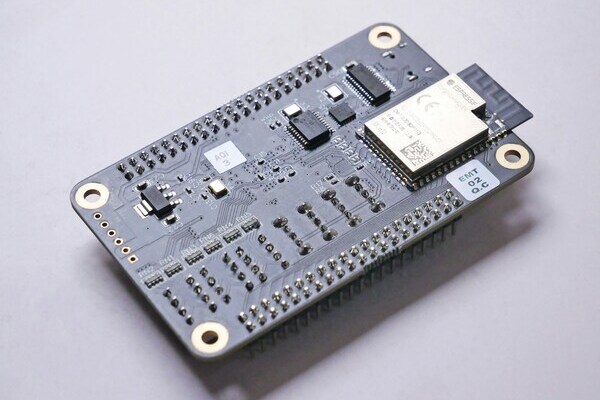
Three Types of ESP32 Development Boards
The most useful way to group an ESP32 development board is by how much product-specific hardware is already integrated.
General-purpose boards: Boards such as a DevKit expose many GPIOs and keep the circuit simple. They are best for firmware learning, sensor evaluation, and proving interfaces before the enclosure and power architecture are fixed.
Feature-integrated boards: These combine ESP32 with a display, camera connector, battery charger, microSD socket, Ethernet PHY, or long-range radio. They accelerate a focused proof of concept, but unused features increase size, sleep current, and BOM cost.
Custom product boards: A custom ESP32 PCB keeps only the interfaces the product needs and adds the correct connectors, protection, mounting holes, test points, and power path. This is the preferred route when mechanical fit, repeatable assembly, and unit cost matter.
A sound development path begins with a general-purpose or feature-integrated board, then moves to a custom design only after firmware, I/O allocation, peak current, and radio performance are understood.
ESP32 Board Comparison
The correct ESP32 development board is determined by radio protocol, processing load, USB function, memory, and the peripherals that must remain available after reserved pins are excluded.
| Series | Core advantage | Connectivity | Best fit |
|---|---|---|---|
| ESP32 Classic | Mature ecosystem and Bluetooth Classic | 2.4 GHz Wi-Fi, Bluetooth Classic, BLE | Learning and general IoT |
| ESP32-S2 | Native USB OTG and simple Wi-Fi design | 2.4 GHz Wi-Fi | USB devices and Wi-Fi controls |
| ESP32-S3 | Dual-core, vector instructions, USB OTG, PSRAM options | 2.4 GHz Wi-Fi, BLE | Displays, voice, camera, edge inference |
| ESP32-C3 | Low-cost RISC-V and efficient BLE IoT | 2.4 GHz Wi-Fi, BLE | Sensors and cost-sensitive products |
| ESP32-C6 | Wi-Fi 6 plus IEEE 802.15.4 | 2.4 GHz Wi-Fi 6, BLE, Thread, Zigbee | Matter and multiprotocol smart home |
Design note: Native USB is not identical across the family. ESP32-S2 and ESP32-S3 support USB OTG, while many C-series devices provide USB Serial/JTAG for programming and debugging. Confirm the exact SoC and module datasheet before assigning a product USB function.
How to Choose the Right ESP32 Development Board
Choosing an ESP32 development board is a requirements exercise: define the radios and interfaces first, then select the smallest board that meets them with margin.
Choose the wireless protocol. Use Classic ESP32 when Bluetooth Classic is mandatory, ESP32-S3 or C3 for Wi-Fi plus BLE, and ESP32-C6 when the product needs Wi-Fi 6 or an IEEE 802.15.4 path for Thread or Zigbee.
Build a usable GPIO budget. List every UART, I2C, SPI, PWM, ADC, interrupt, enable, and test signal. Subtract pins reserved by flash, PSRAM, USB, strapping, or the selected module before judging a board by its header count.
Size memory for the workload. Sensor logging and simple web control often fit internal RAM. Camera buffers, large displays, audio pipelines, and edge inference commonly benefit from an ESP32-S3 module with PSRAM.
Check power and USB architecture. Confirm connector type, USB data capability, regulator output, battery charging, reverse-current behavior, and sleep-current contributors. A convenient power LED or USB bridge can dominate the current of a battery prototype.
Verify mechanical fit and documentation. Measure board width, connector overhang, antenna position, header pitch, and mounting access. A board that blocks both sides of a breadboard slows debugging, while an undocumented pinout creates avoidable risk.
Compare development cost with production cost. A larger board is often cheaper during engineering because it exposes signals and shortens bring-up. In production, a custom ESP32 PCB can remove unused circuits, reduce connectors, and add repeatable programming and test access.
Quick Selection
Beginners: Choose an ESP32 DevKitC-style board with a documented pinout and onboard USB programming.
Camera, display, voice, or edge AI: Choose an ESP32-S3 development board with enough flash and PSRAM for the actual firmware and frame buffers.
Low-cost connected sensor: Choose ESP32-C3 when BLE and 2.4 GHz Wi-Fi are sufficient.
Matter, Thread, or Zigbee: Choose ESP32-C6 and confirm the intended protocol stack, antenna arrangement, and certification plan early.
How to Design a Custom ESP32 Development Board
A custom ESP32 development board should preserve proven functions while replacing generic circuitry with product-specific power, connectors, protection, and test access.
Select a module or chip-down architecture. Use a certified module for lower RF and assembly risk. Choose chip-down only when the business case supports antenna tuning, crystal and flash design, RF testing, and the additional certification work.
Design the 3.3 V rail and reset path. For Classic ESP32, use a 3.3 V source capable of at least 500 mA, place at least 10 uF at the main power entrance, and add local decoupling close to the device. Keep CHIP_PU from floating and validate reset timing under slow battery ramps and repeated power cycling. Recheck the selected family's current and timing requirements rather than copying values blindly.
Implement programming, Boot, and Reset. Route UART or supported USB signals with ESD protection, expose accessible Boot and Reset controls, and reserve pads for production programming. Review every strapping pin against attached peripherals so a sensor, pull resistor, or connector cannot force the wrong boot mode.
Protect RF performance. Place a module antenna at the board edge and keep copper, traces, components, batteries, displays, cables, and enclosure metal out of the specified antenna zone on every layer. For a Classic ESP32 module, maintain at least 15 mm enclosure clearance around the antenna when the product geometry allows, then verify range and throughput in the final housing.
Complete layout and DFM checks. Maintain an unbroken ground reference, use short return paths, keep switching nodes away from the antenna and analog inputs, and place bulk capacitance near the radio load. Add fiducials, clear polarity marks, accessible test pads, and enough edge clearance for the chosen panelization method.
Release complete manufacturing data. Provide Gerber or ODB++ data, NC drill files, a BOM with manufacturer part numbers and approved alternatives, and a centroid file with side, X/Y position, rotation, and reference designator. Include an assembly drawing, stackup notes, controlled-impedance requirements if any, and a firmware or functional-test instruction.
Assemble and validate the first article. Before full PCBA production, inspect orientation and solder joints, current-limit the first power-up, verify 3.3 V and reset, confirm programming, and run GPIO, USB, Wi-Fi, BLE, and range tests. Record results by board revision so failures can be traced to design, assembly, firmware, or components.
When the ESP32 PCB files are ready, PCBgogo can combine PCB fabrication, component sourcing, SMT assembly, AOI, and electrical testing in one production flow. Upload the fabrication data, BOM, and pick-and-place file for an engineering review and quotation, and specify whether PCBgogo should source all components, assemble consigned parts, or use a mixed model. This handoff is most effective when the order package also includes the assembly drawing and an objective first-article test plan.
Conclusion
Choose an ESP32 development board from the required radio, usable GPIO, memory, USB function, power architecture, and mechanical envelope rather than from headline specifications alone. Move to a custom ESP32 PCB when the prototype is stable and the product needs better fit, lower recurring cost, controlled power consumption, or production test access. Prepare a complete release package and request a PCBgogo PCB assembly quotation to turn the validated design into a traceable first article and scalable build.
PCBgogo - Reliable, High-Quality PCB Manufacturing
PCBgogo is a one-stop PCB and PCBA manufacturing factory, helping you save time and costs while ensuring consistent, reliable quality.
Get a Free Quote >